
Segmentable Ruler
Seamus Finlayson
Segmentable Ruler
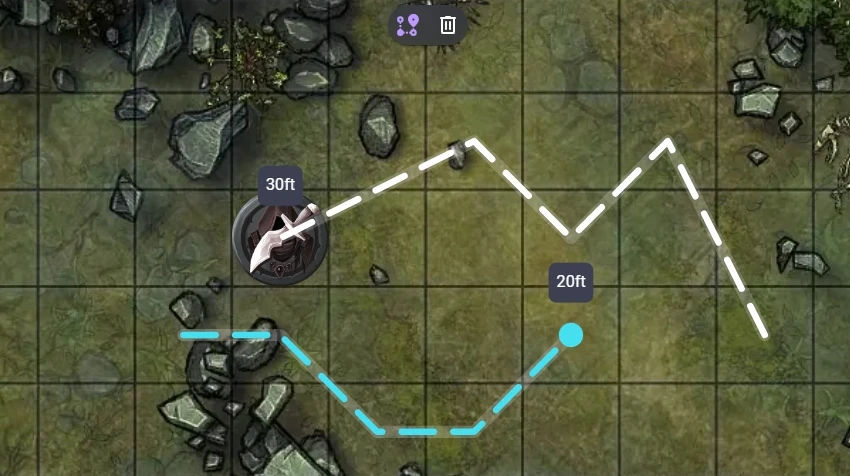
A ruler for measuring segmented paths
How it works
Setup
- Install the extension
- Make sure the extension is enabled in the room in which you wish to use it
- Select the Segmentable Ruler tool in the toolbar or use the shortcut Z
Making a measurement
- To begin measuring, click a token or an empty spot on the map
- To add ruler segments, click spots on the map
- To remove a segment, press Backspace, Delete, or the Remove Segment button at the top of your screen
- To finish a measurement, double click on the map, press Enter, or press the Confirm button at the top of your screen
Clearing rulers
- A player's ruler is automatically cleared when the switch to a different tool
- You can manually clear your ruler by clicking the trash icon at the top of your screen. When a player with GM access clicks this button, it will clear all rulers, not just their own
Features
- Allows for complex paths with many segments to be measured
- Easy to create new segments and remove unwanted segments
- Works with all grid and measurement types
- Hides measurements for hidden tokens
- Allows you to make measurements privately
- Holding ctrl while starting a measurement prevent tokens from being moved
- Rulers check that players have the correct permissions before moving tokens
Limitations
- Doesn't show measurement value to other users properly while measuring
Feature Requests
I may accept feature requests but - as I have limited time and development plans of my own - being a paid member on Patreon is your best path to getting a feature implemented.
Support
If you need support for this extension you can message me in the Owlbear Rodeo Discord @Seamus or open an issue on GitHub.
If you like using this extension consider supporting me on Patreon where paid members can request features. You can also follow along there as a free member for updates.