Colored Shapes
Anthony Hauck
Colored Shapes
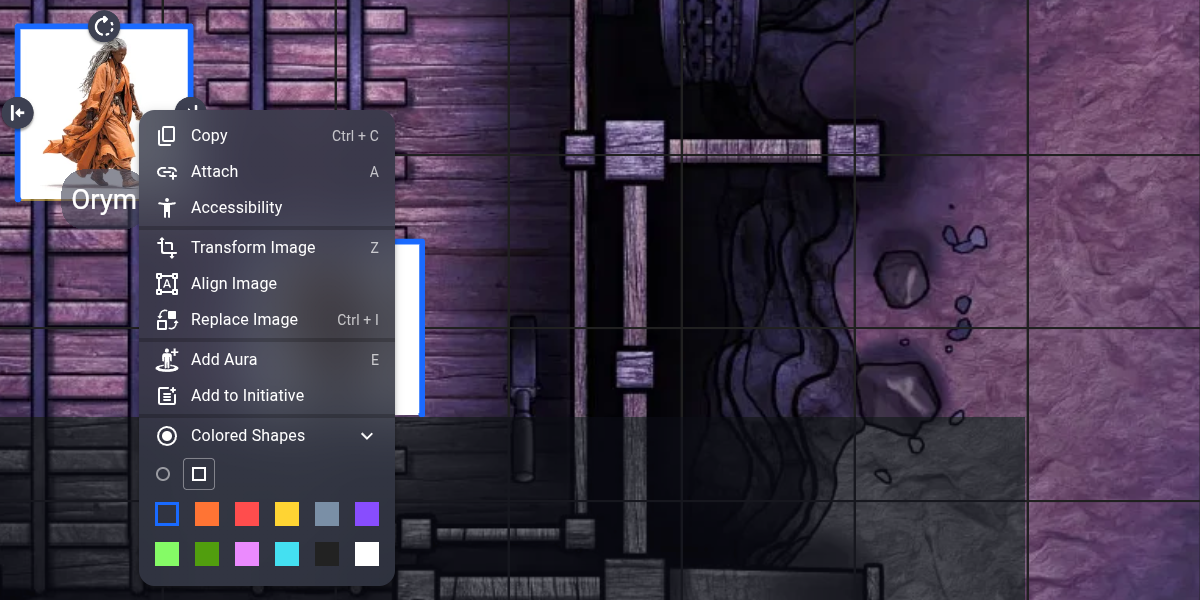
Add colored status rings or squares to any character token to track conditions, initiative, targeting, or anything else your table needs.
How to Use
- Select one or more character tokens on the map
- Right-click (or use the context menu) and click the Colored Shapes icon
- Pick a color to add a ring or square — pick the same color again to remove it
- Use the toggle at the top of the panel to switch between ring and square shapes
Multiple shapes stack with automatic scaling so they never overlap each other. Rings leave a gap at the bottom so character token labels stay visible.
Features
- 12 colors to choose from
- Toggle between open ring and square shapes per session
- Stack multiple colors on one token
- Shapes scale automatically when stacked
- Rings leave a gap to keep token text readable
- Shapes stay attached and move with their tokens
Support
For bug reports or feature requests, open an issue on GitHub.